X

Get a copy of my Powerpoints now!

Thank you! Your submission has been received!
Oops! Something went wrong while submitting the form.

Kiki's Portfolio

This website is a collection of all the work I have done for my Digital Marketing Level 3 Apprenticeship with Big Creative Education where I am working with Konnect Digital.

Evidence

SEOs

SEOs, Keywords and Domains

  • On-page audit - Summing up the title and description of a web page and how this can affect the SEO and domain authority. Improvements made means they will rank higher, including changing the length of title/description, using target keywords and adding internal/external links. 
  • Keyword List - I looked at different keywords that rank between 1 - 30, that have low competition and a good traffic/volume of searches that relate to Konnect Digital.
  • Content ideas - The content ideas I found related to the keywords and what type of content we could make based on these.
  • Domain authority report - Here, I looked at our competition and how high their domain authority is. This included looking at where links to their website linked on external pages and finding where Konnect Digital could make use of external links, like writing for certain companies, to improve our domain authority.

Email Marketing

Strategy

  • Campaign objectives - this can be more purchases, email signups, brand awareness etc. For Konnect Digital, they want to grow their database of buyers/sellers and their build awareness as a major company in the TV and Film Rights industry.
  • Define KPI's - also known as key performance indicators. They are measures of the performances of different aspects of an email campaign. For example, open rates, click rates, lead generations, time it takes to open etc. With Konnect Digitals campaign's in the past, such as their newsletters, they have wanted to focus more on open rates so the readers can get an idea of who they are, their brand, and what they do.
  • Professionally designed emails and landing pages - Designs reflect the brand and values of a business and aesthetics are very important right now. Your emails and landing pages obviously need to look nice and reflect your brand (colours, logos etc), but they also need to be easy to use and not have too much information that the reader might get bored.
  • Contact list management and list segmentations/targeted emails - it is important for any business to keep track of their contacts and who have given permission to be apart of their subscription list so they can make email campaigns accordingly. List segmentations are also key when you create targeted campaigns/emails so you can create a message that focuses on the readers and their preferences. For example, Konnect might want to target buyers and sellers separately to deliver a more focused and clear message and have a different call to action. They can also see who have been blacklisted and they remove these emails, which make it a lot easier for us to manage.
  • Website and CRM integration - it is important for the programs that you use are able to integrate with other programs, specifically ones used to send out emails, as you want to create a full database and see complete analytics etc. Mailchimp, if Konnect were to ever use them, can integrate with pipedrive, sendinblue and hubspot, which are all the programs we use for databases, emails and social media.
  • Full metrics reporting - you need to be able to see all metrics for emails, like open rate, click rates, conversion rates, time it takes to open, lead generations, repeat opens etc. Once you have these from your email campaigns, you can change whatever you need to accordingly. For example, if not many people have clicked on your call to action, you might need to make this bigger and clearer to use.

Types of Emails

  • Transactional - acknowledging an action that has happened e.g confirmations, changing passwords etc.
  • Newsletter - sent at regular intervals, can include updates, news, education, blog etc.
  • Digest - a digestible email with links or statistical content listed out. Usually automated based on preference. For example, Indeed job list.
  • Lead nurturing - emails sent out, usually to nurture leads, persuading them to do business with you. Usually automated until you sign up.
  • Dedicated - separate from funnel. Stand alone email with one key focus and unrelated from your other content.

List Building

Methods of list building

  • Gated content - give us your data and your signed up, explicit consent
  • Competitions, surveys, quizzes - results come through emails etc
  • Newsletter sign ups
  • Pop ups on websites - this can include using dark UX e.g Klarna

Newsletter signs up often come through pop ups on websites too, which can be made using programs such as Poptins. Automated pop ups are based off of website data so wouldn't be good for new websites. They can enter their details for a benefit and then they have given their consent. Having a thank you page afterwards will be easy to track. The more targeted the messages, the better.

Some things to remember when it comes to list building and email marketing:
- You need permission.
- Don't buy data as it can give a negative view of your company. Cold emails don't look professional as they don't typically look nice and don't have a good template.
- Data that you have built yourself is called warm data and much easier/more professional to use.

Landing Pages

Analytics
Bounce Rate - how quickly they go
Conversion rate
Design - simplicity for landing pages is important
Engagement
Flow - from headline to goal, like a narrative
Goal - usually only one goal for a landing page
Headline - get the next sentence read
Imagery - to engage all senses
Justification KPIs - know what you’re measuring
Layout - should compliment design
Mistakes - avoid slow loading pages etc
Navigation - don’t want them leaving a landing page

Optimisation - always test
Performance - quicker the better
Resistance - use reviews etc
SEO - use keywords that stick
Traffic - steady flow
Understanding - understand customers
Visuals
Writing - copy is underrated
Xray - understand everything you’re doing
You - write as your brand
Zen - simplicity is key
Subject Lines for Emails

  • 'The word 'free' usually ends up in the spam.
  • Don't want it to be too easy to read but not too hard either.
  • Always think of your audience - always needs to be on brand no matter what statistics.
  • Want it to be catchy but no clickbait.
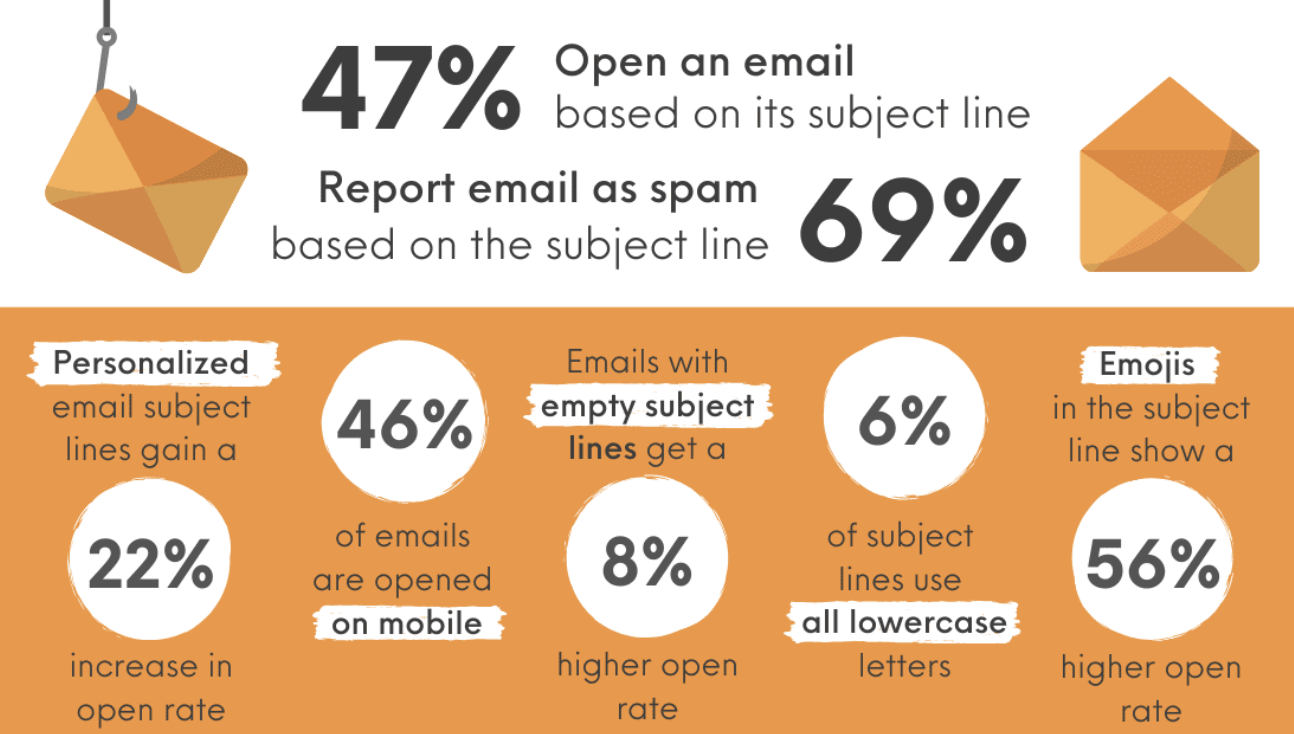
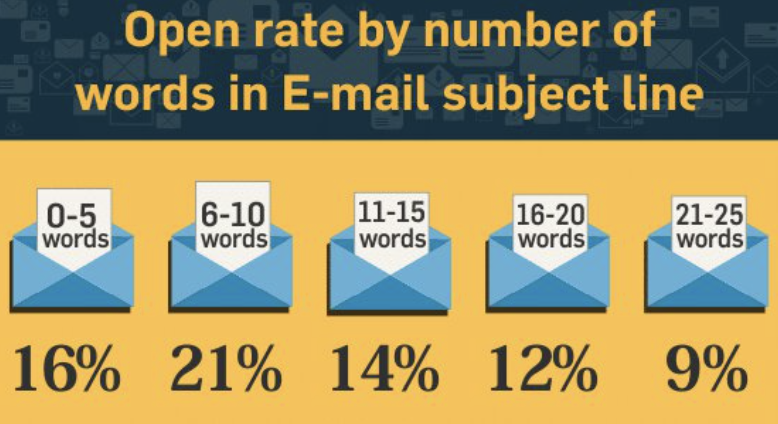
Statistics of email subject linesOpen rate statistics for emails based on subject lines

Anatomy of a Good Email

  • Subject needs to be catch, engaging and concise without having any clickbait.
  • Content width needs to be between 600 - 620 pixels wide.
  • Needs to be on brand including colours and logos.
  • Needs to be relevant and personalised. Programs like Mailchimp have merges where you can replace the names etc.
  • Inverted pyramid - focus layout around the CTA.
  • Images should be high quality and not blurry.
  • Text hierarchy - use font size and weight to create a clear hierarchy.
  • Call to action should be clear and easy to understand.
  • Animation/photos - should be relevant and not too distracting.
  • Alt text - does your animation/photos have a text fallback?
  • Accessibility - is your text size at least 16pt? Have you used alt text for those using a screen reader?
  • Web fonts - do you have system fallbacks where web fonts aren't supported?
  • Copy - keep it relevant and straight to the point.
  • Mobile and email friendly - make sure that your emails are responsive on all platforms, including mobile, and all email providers, e.g, gmail, outlook etc (litmus.com tests on all devices).
  • End - make sure all small copy is there, including unsubscribe and why they are receiving that email (like did they sign up?)
  • Personalisation - can use merge tags (mailchimp) to personalise emails and subject lines.

Email Copywriting

  • Be relatable.
  • Strong narrative.
  • Make it brief as possible, people won't want to read it if it's too long.
  • Keep paragraphs short.
  • Use the second-person voice.
  • Make it as personal as possible (especially B2B).
  • Give audience what they want (and can use behavioural psychology too).
  • A/B test always to make sure if it works/looks nice.
  • Focus your email and copy on your actional language and CTAs so the readers know what they need to do.

Social Media

Steps For Success On Social Media

Although social media doesn't drive the most traffic for a lot of companies, it still allows us to show our brand and value. This is why there are always things to consider when creating a social media strategy:
  • Research and get to know your audience.
  • Choose the platforms that will work for your company.
  • State your Key Performance Indicators (KPIs).
  • Align the members of your company around the plan and any responsibilities they should have.
  • Write a social media playbook including rules you should follow, personas, targets, KPIs etc.
  • Plan and schedule content for the week so it is consistent.
  • Create a content bank so there is always content to post.
  • Post relevant content at the right times.
  • Treat all social media platforms separately and have different ideas/content for each depending on what performs better there.
  • Assign someone as a customer service rep. Always reply to comments and messages.
  • Track metrics and analytics and create reports so you can see progress.
  • Reanalyzie your strategy if you need to to make sure it is still accurate and providing results. Can also use A/B testing.

Style Guide and Rules for social media

Style Guide and Rules

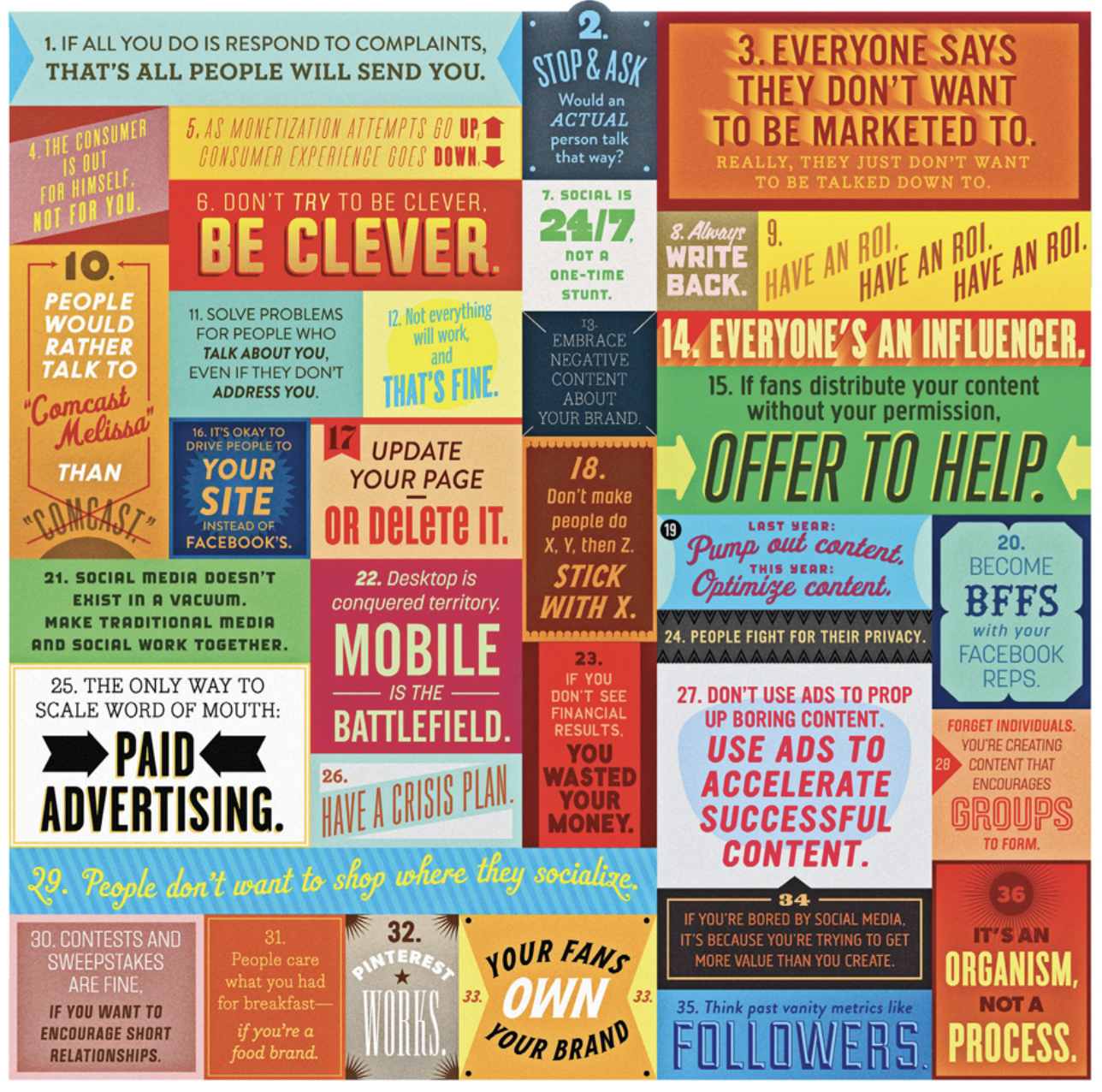
It is important to know the rules of social media before you use it. The rules you establish for your brand will allow you to stay consistent, help your message and to grow efficiently on social media. Having a rule book/style guide also means you can share with you team so everyone is on the same page but also any new people in the company can understand your branding and message easily.

There are 36 general rules established for brands and social media. You should use some of these when they apply to your brand.

Below is the style guide for social media I have created for Konnect Digital. This includes our goals, audiences, content pillars, voice/tone, hashtags, emojis, timing, good and bad examples of posting, guidelines and inspiring bands.
Statistics and Times to Post

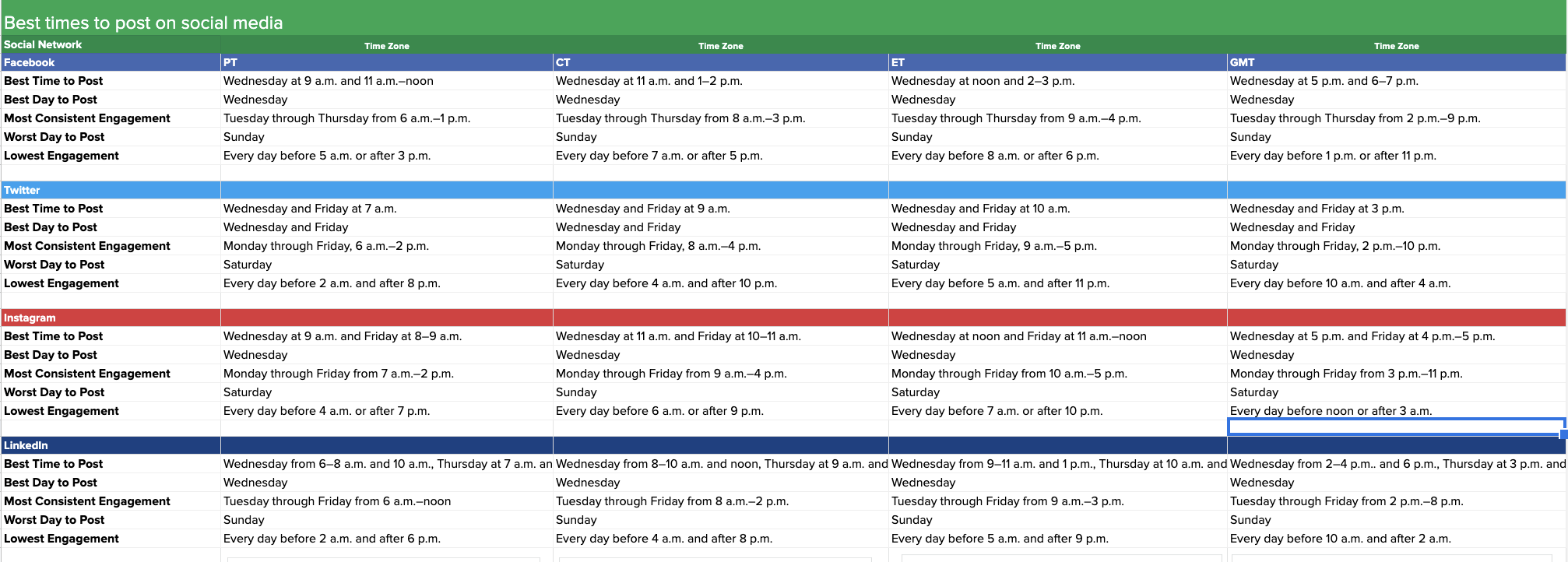
Below is a collection of the best times to post on Facebook, Twitter, Instagram and Linked (which is what we primarily use). This includes the best time to post, the best day, days with consistent engagement, worst day to post and the lowest engagement.

Below this are some statistics of the platforms Konnect Digital use, including active uses, views and minutes used.
Best times to post on different social media platforms

Planning Content

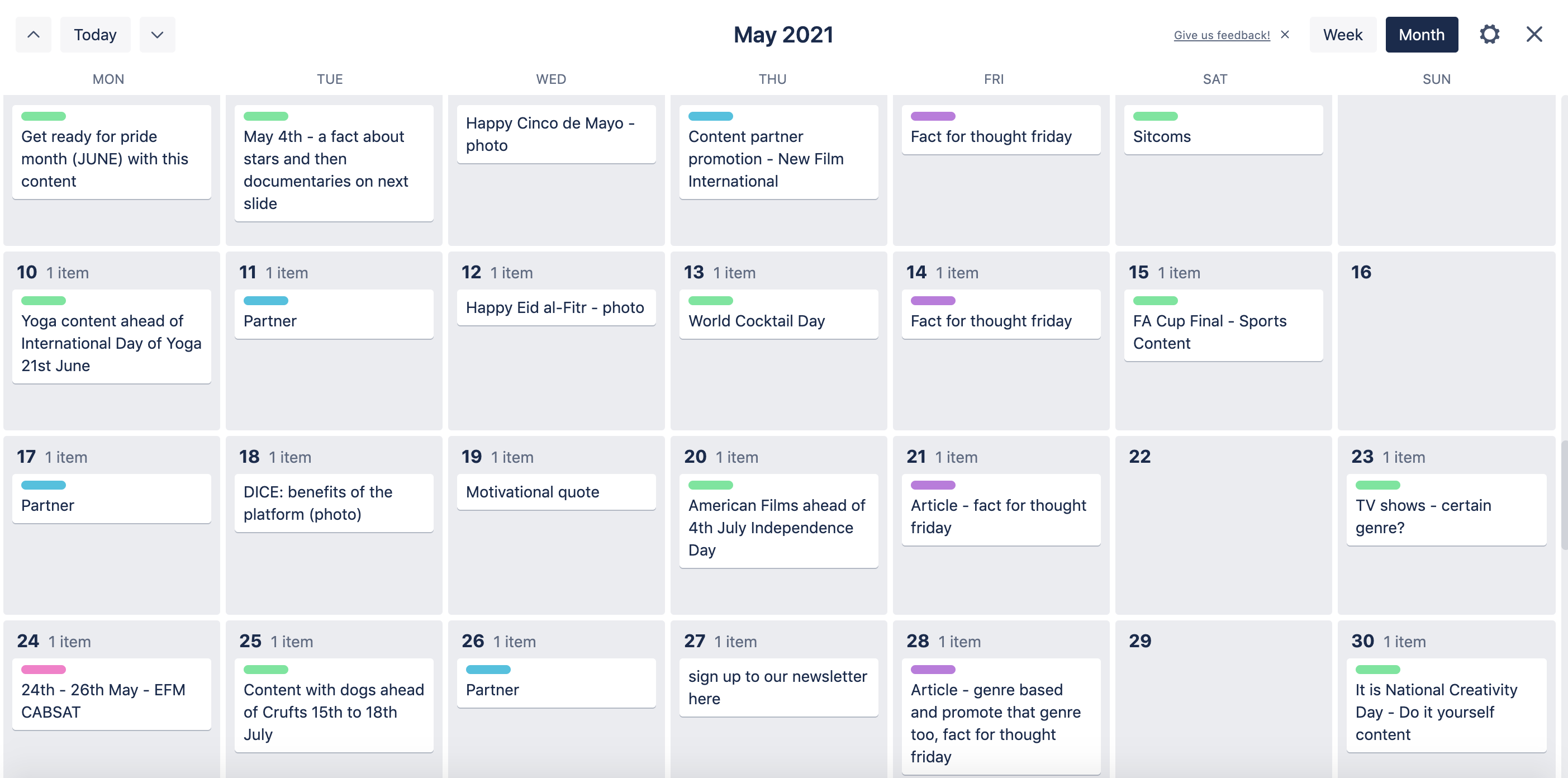
Planning out your content for social media is extremely important as you always want to be organised and on brand. This also allows your whole team to know what is happening and what they're roles are in the social media strategy. There are many tools to use, including Miro, Trello, Sheets and many social media schedulers. Miro is good when planning the topics your company can discuss that will stay consistent and sheets can allow all types of organisation.

I have experience of planning out content with Konnect Digital as we use Trello and Zoho Social Scheduler. This allows me to plan out the monthly content calendar, including specific dates and events, and we plan content for all our content pillars for that month. I also assign who is creating the content and create checklists to see how we are doing so i can schedule the week before we need to post. This also allows us to get approval from the team and we can also track content we have already posted and permission we need to get from partners beforehand.
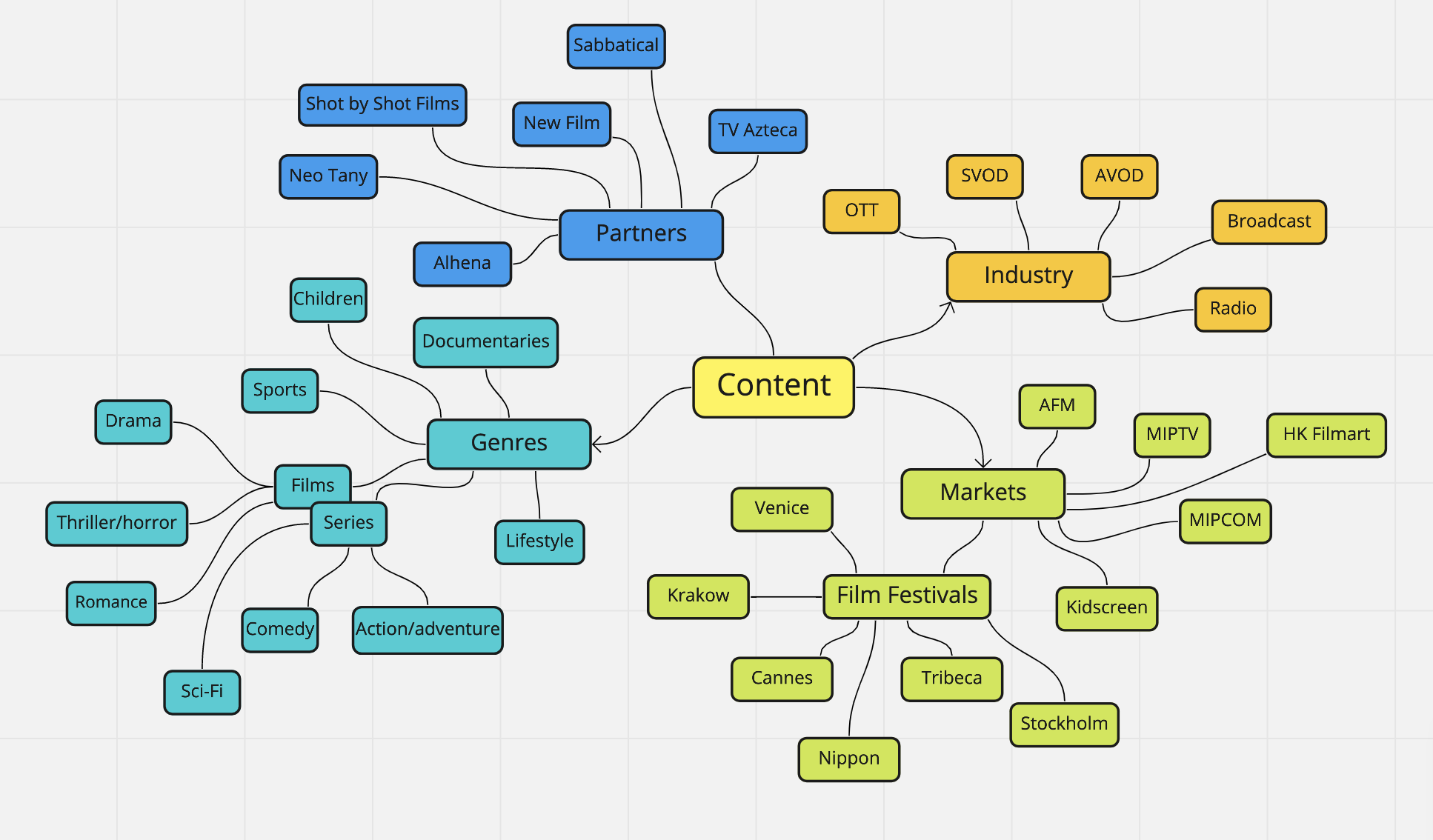
Content that Konnect Digital can post aboutSocial media content calendar for Konnect Digital

Creating Social Media Content

4 main reasons any social media content is made:

To entertain
– this will have a strong emotional appeal to an audience, making it very shareable.
To educate
– this will allow for a wide reach especially for those who might not be in the know about products or services just yet. Again, this is often very shareable.
To persuade
– This is slightly more emotionally charged; content that gradually changes the mind of the consumer (I say consumer as persuasive content will often be used in a product sense).
To convert – Content that is more often than not rational rather than emotional as you will need a decision-making brain when considering what a conversion piece has to offer you.
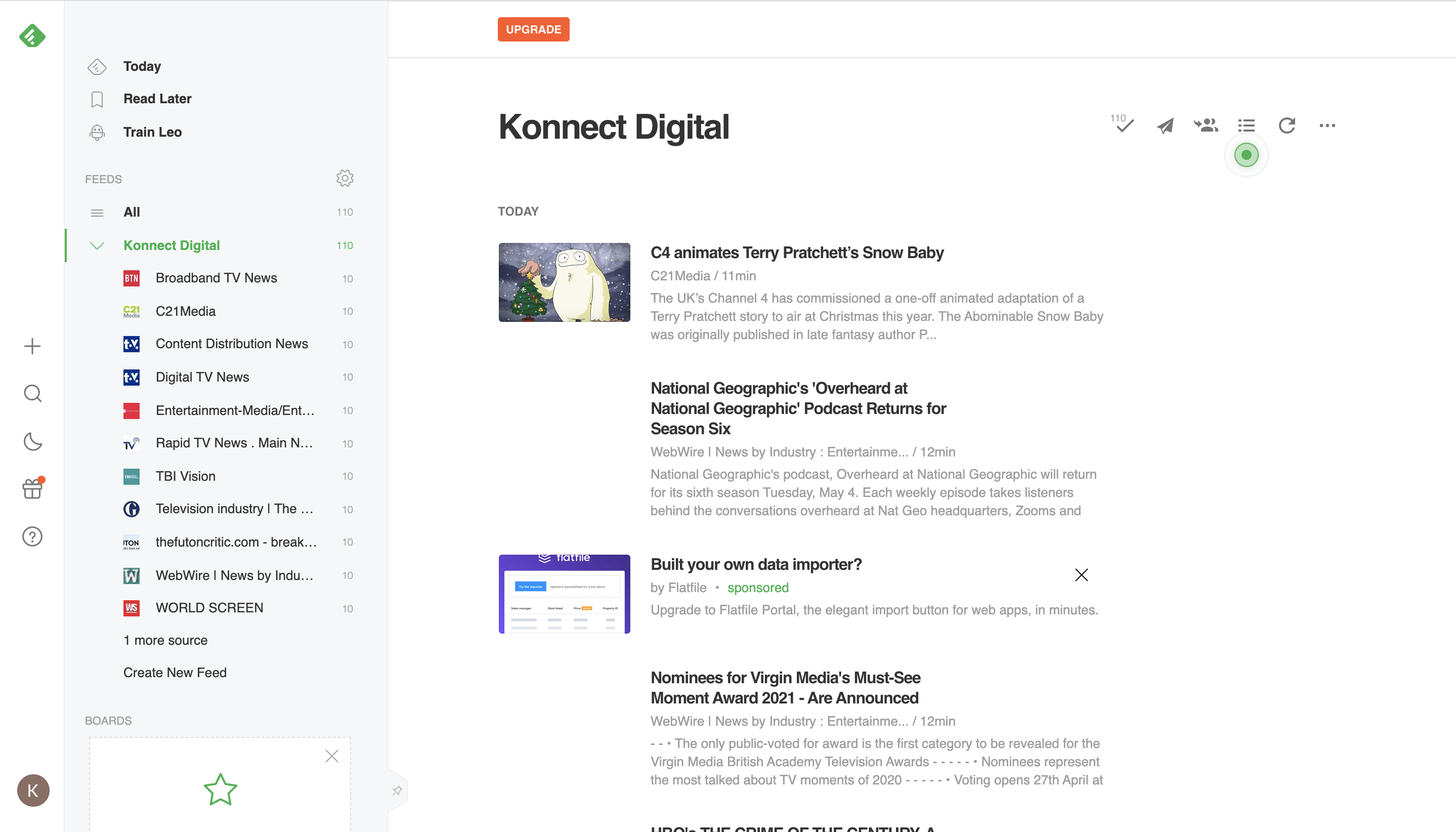

Feedy content for Konnect Digital

Curating Content

You can add your own voice to already made content in your industry n certain, interesting topics that your audience will enjoy. When you are doing this, its basically sharing your opinion on already created content and this will help with:

1. Be recognised as an expert.
2. It's easier than creating your own.
3. Show you're in the game.
4. Grow your network.
5. Grow your business.
6. Stay informed.

Copy, hashtags and trends

There are lots of rules for copy that you can follow which are beneficial for B2B social media channels. Some of these include:
  • Before after bridge - showing how we can make things better
  • Problem, agitate, solve - annoy them about a problem but then solve it
  • Features, advantages, benefits - what your product can do
  • The 4 C’s - clear, concise, compelling, credible
  • The 4 U’s - useful, urgent, unique, ultra-specific

Hashtag trends within the entertainment industry

Trends

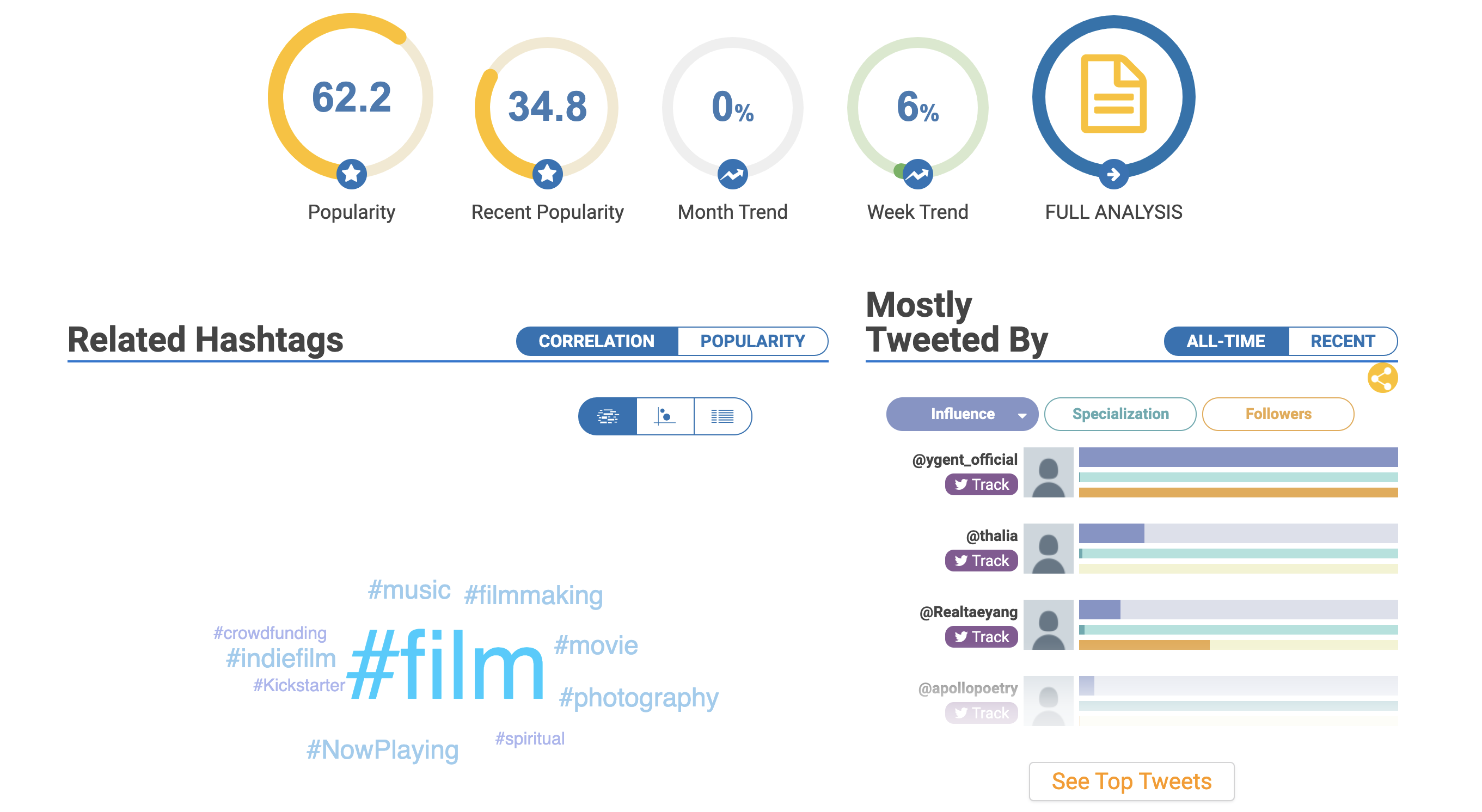
Need to keep up with the trends, especially within industry (like entertainment) and relevant topics at the time and in the world (like pandemic) and social media (like any new updates and trends). Trends can also come in hashtags around Twitter and Instagram and companies can use these in their own social media strategy.

To the left is the trend for #documentary which would be relevant to Konnect Digital. It shows the popularity and the weekly and monthly trend and other hashtags related to it.
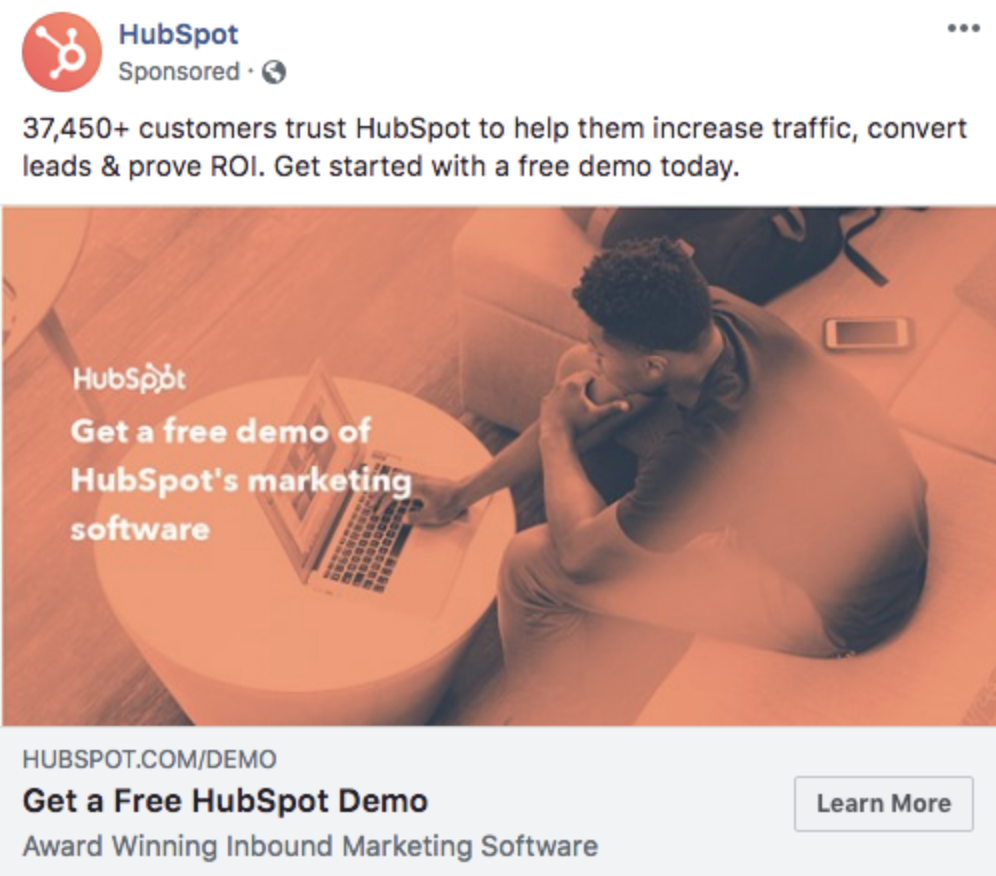
Example of an advert from Hubspot

Paid social and analytics

Your paid campaign on social needs to have the following defined:

  • The core objective
  • The target audience
  • Budget
  • Creative
  • Plan for conversions

Non committal CTA is popular - like learn more.

You can then look at analytics. You can see who unlikes and hides your adverts, this signals to social media platforms that people don’t want to see your content so your reach will suffer.

Posts with high engagement are good to boost as a paid ad.

Below are some Instagram paid social tips too.

Example of an advert from Hubspot

Paid social and analytics

Your paid campaign on social needs to have the following defined:

  • The core objective
  • The target audience
  • Budget
  • Creative
  • Plan for conversions

Non committal CTA is popular - like learn more.

You can then look at analytics. You can see who unlikes and hides your adverts, this signals to social media platforms that people don’t want to see your content so your reach will suffer.

Posts with high engagement are good to boost as a paid ad.

Below are some Instagram paid social tips too.

PPC

PPC Campaigns

Pay-per-click - Google Ads for example. Your targeting has intent, you’re understand the intent behind that person's search and they are intentionally searching for what you are advertising.

You need to plan out exactly how the campaign is going to work.

Adwords process:
  1. Adwords audit
  2. Keyword search
  3. Competitor research
  4. Ad creative and copy - what ads will you choose? Banners or ad searches, shopping ads, video ads on YouTube etc
  5. Landing page design - for conversion purpose only
  6. Account set up
  7. Tracking set up
  8. Campaign launch
  9. Monitor Campaign
  10. Assess, analyse and improve

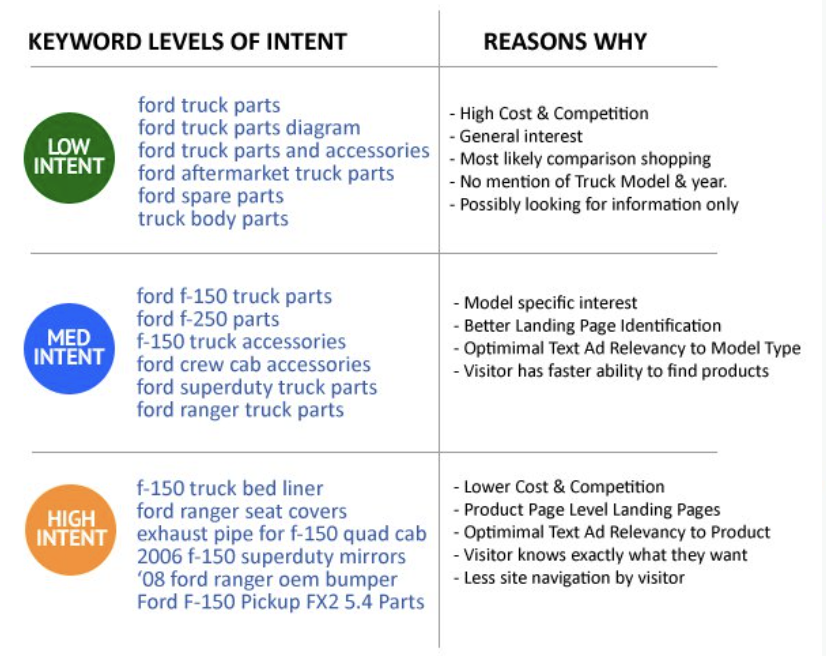
High intent, mid intent and low intent examples of keywords

Keyword Strategy

Google ads charge different industries a different amount. Also, the more competitive and profitable the market is, the more expensive the ads usually are.

Keyword levels of intent: need to balance out the low intent and high intent keywords. Even if the search volume for a word is low, the intent might be high because it could be really specific.

Very important that the keywords are on the landing page and they are sent to the right one. You can then track what ads people have come from.

Broad match modifier: (don’t think they use this anymore), Broad + match + modifier : this covers a wide target

Phrase match : you want people to search for exactly what they have written but it can be a different combination. E.g black trainers but also trainers black

Exact match: The exact search term, including plurals. 

Negative keywords: Don’t want your ads to show similar words but different products.E.g keyboards but not computer keyboards.


PPC campaign structure

Each campaign must have one key message with groups of more targeted and specific messages. Per every one campaign, ita advised that you have at least 3 ad sets (certain ad areas within your campaign) and 3 ads per group (individual ads for the ad sets).
  • Schedule: what times and day
  • Budget
  • Bidding: where the CPC comes into place, how much do you want to spend on an ad
  • Targeting: can use data sources and existing data for this
  • Placement: where will the ads appear. Want your own visuals for all ads
  • Creative: images, links, videos, text
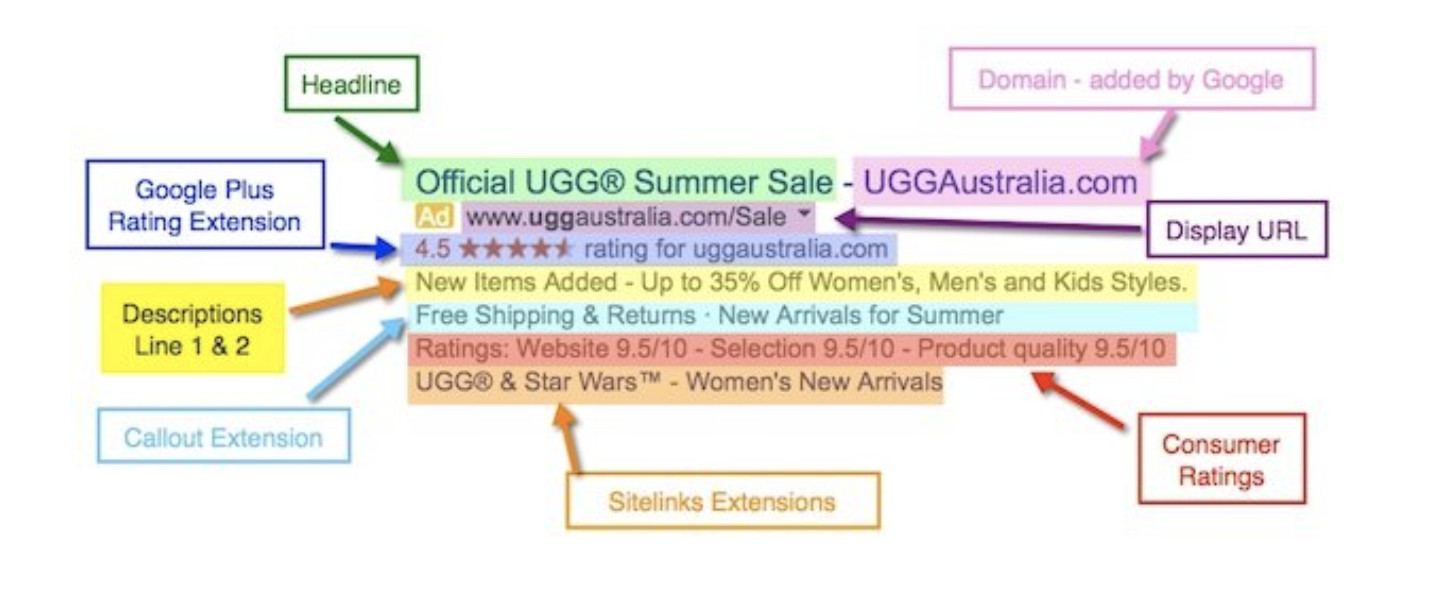
Example of a Google ads advert from Ugg

What makes a good ad?

  1. Know what your target market wants - answer the question that is being searched
  2. Address your audience - use inclusive language and say ‘your’ etc
  3. Emotional triggers where possible
  4. Use numbers - they work quite well, more realistic when you usr a non round number like 1633 rather than 1500
  5. Remove objections to using/buying your products
  6. Use all your space
  7. Emphasize what makes you stand out
  8. Go local - makes it more relevant to the audience
  9. Use strong CTA
  10. Split test your PPC ads frequently, always test
  11. Make sure the ad text it relevant to the text on the landing page

Extensions and expanding ads: usually have to be a high ranking ad to get these. Callout extension: what makes your stand out. Consumer ratings: if you have the data available

Metrics

Most important metric rates for PPC are CTR and Conversion Rate. They are the biggest indicators of success or failure. You can use industry benchmarks to help as your first KPI too and you should research this before setting goals etc.

  • CTR (click through rate) = Shows the info is relevant.
  • Conversion rate = info is relevant and you’ve done enough to persuade them to convert.

For Konnect Digital:

  • Click through rate for B2B is 3.04
  • Around ⅓ leads lead to deals (close rate is 33.33%)
  • Average cost per click for B2B is £2.36 (converted from dollars)
  • Single deal value is around 1000 probably so profit is £767.08

Display Ads

Display ads are more focused towards brand awareness than conversion. You can get the visuals of your brand in front of loads of people so they are aware of your brand and they don't have to click it to know who you are and what you do. This is why the metric is Cost Per Mil (CPM).

You can create a variety of display ads for different websites etc. You can make banners, gifs, JPEGS, youtube ads etc.

Competitor Analysis

What is Competitor Analysis?

A competitor analysis is researching your competitors' overall marketing strategy, branding, techniques, audience, earnings, popularity etc and seeing how you can make your marketing strategy better compared to them.

Some terms:
  • Micro environments (directly related to you in the business like social media)
  • Macro environment (how they are positioning themselves, wider environment).
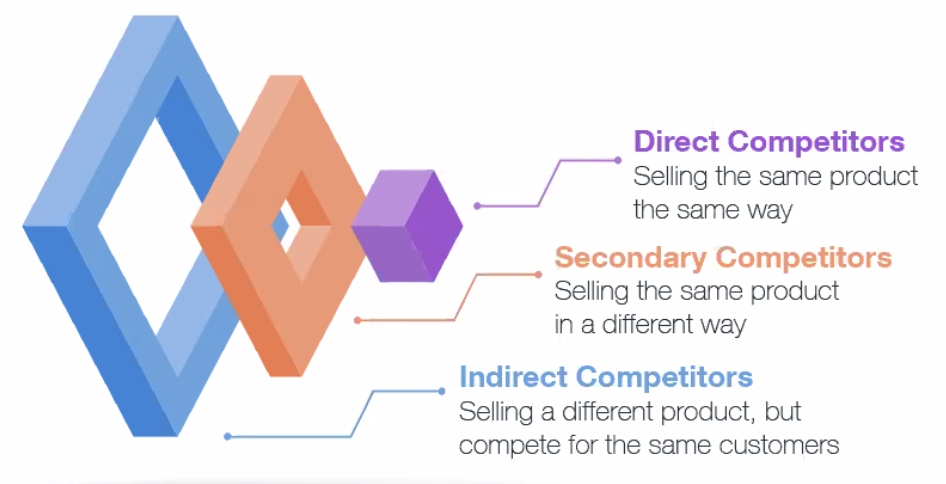
  • Direct competitors - if the company didn’t exist, who would they go to. These can also be based on location/audience e.g red bull and lucozade
  • Indirect competitors - e.g red bull and fizzy drinks
  • Red ocean - super competitive, hard to pierce the market
  • Blue ocean - area that is completely free of competitors, no one is doing this/has done before


Doing a Competitor Analysis

  1. Define your competitors - Konnect Digital's direct competitors are VUULR, Allrites, Mediabank and RightsTrade.
  2. What products do they offer - Review their products/services, their pricing, how it is distributed etc.
  3. How do the sell their product - look at their locations, growth, sales, tactics and processes.
  4. Analyse engagement - what topic, themes and content are performing well for them, how is their engagement overall.
  5. How was products promoted - look at keywords, ads, websites, messages, traffic, platforms used etc
  6. What is their social like - analyse and report on the social channels they are using, their performance, frequency, fans/followers etc


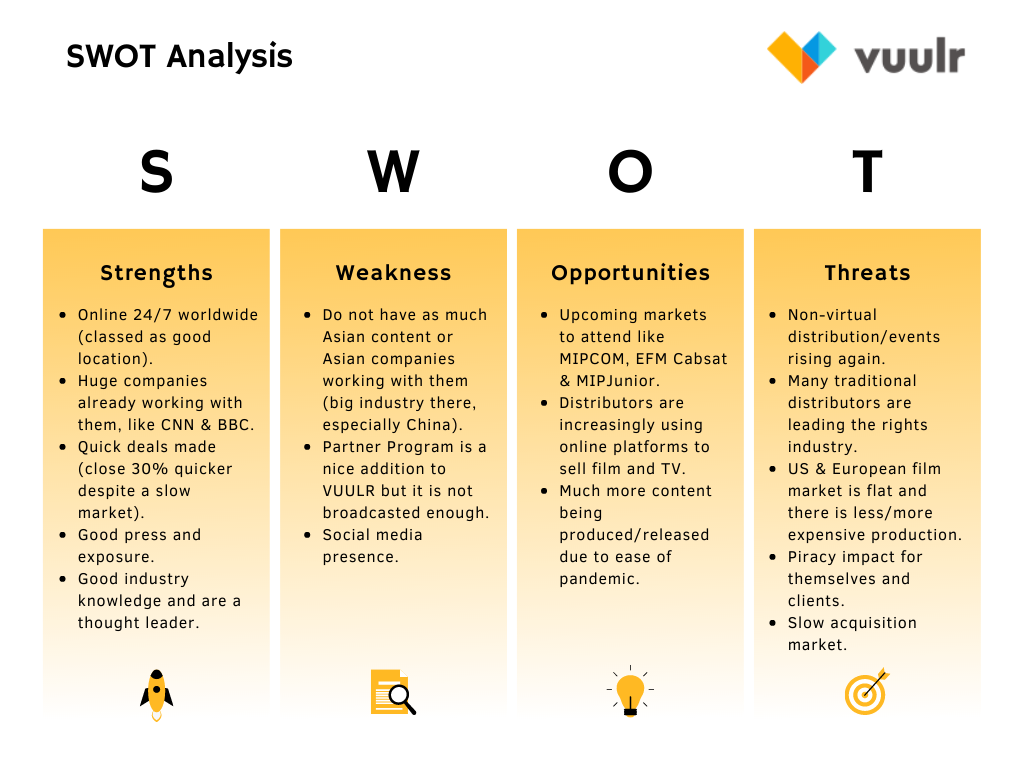
SWOT Analysis

(strengths, weaknesses, opportunities & threats)

Opportunities & threats = stuff that is out of the companies control, external

Strengths & weaknesses = internal

Coding

Algorithms

Sets of step by step instructions for the computer to follow. They are at the heart of all computer programs. For example, Google search engines use algorithms to take the criteria of website, put it through its judging process then outputs its rank.
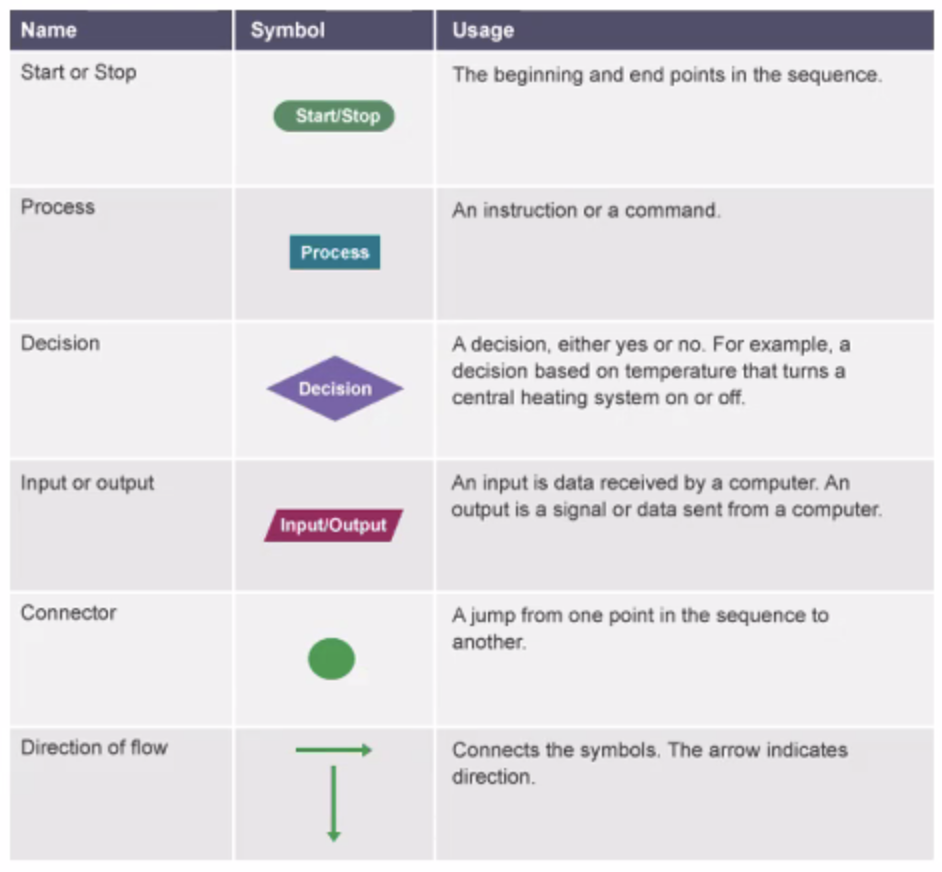
Algorithm and flowchart examples

Flowcharts and Pseudocodes

A pseudocode is an algorithm in words before it is transferred to code.

Algorithms have values that can be constant or variable.
These values are stored in a memory location and can be changed, depending on the output that is needed.

Algorithms use control flow to make decisions about which order to do things. They can repeat actions or start new actions based on new information.

Computer programs use sequence, selection and iteration to control the flow of the program.

  • Sequence - Straight flowchart
  • Selection - infinite, keeps going and going.
  • Iteration - Flowchart with choices, selection processes

Software development Cycle

The software development life cycle is the name of the overall process of developing software from start to finish. When starting any new software project, it is important to plan how it will be developed and maintained.

  1. Requirement analysis - Also known as analysis stage. When the team decide what the software needs to do.
  2. Design - The visual appearance and the programming behind the
    software. The team will use pseudocode and diagrams to work out how the program should go.
  3. Implementation - The program code is written. Good pseudocode allows the implementation stage to be relatively easy.
  4. Testing - This involves testing the program under various conditions to make sure it is going to work. You need to think about what devices it could be used on and what might cause the program to crash.
  5. Evolution - The software is ready to be launched, but after it has been launched you will need to think about how the software evolves. Software needs to be maintained to ensure it works on new systems.

HTML

HTML stands for HyperText Markup Language. HTML provides structure to the content appearing on a website, such as images, text, or videos. Right-click on any page on the internet, choose “Inspect,” and you’ll see HTML in a panel of your screen.

Organisation

One of the key HTML elements we use to build a webpage is the body element. Only content inside the opening and closing body tags can be displayed to the screen.

Once the file has a body, many different types of content – including text, images, and buttons – can be added to the body.

There are 6 heading tags (H1, H2, H3, H4, H5, H6).

Attributes

If we want to expand an element’s tag, we can do so using an attribute. Attributes are content added to the opening tag of an element and can be used in several different ways, from providing information to changing styling. One commonly used attribute is the id. We can use the id attribute to specify different content (such as <div>s) and is really helpful when you use an element more than once.

Texts

If you want to display text in HTML, you can use a paragraph or span. You can also style text using HTML tags. The <em> tag emphasizes text, while the <strong> tag highlights important text (bold writing).

The spacing between code in an HTML file doesn’t affect the positioning of elements in the browser. If you are interested in modifying the spacing in the browser, you can use HTML’s line break element: <br>.

In addition to organizing text in paragraph form, you can also display content in an easy-to-read list. In HTML, you can use an unordered list tag (<ul>) to create a list of items in no particular order. An unordered list outlines individual list items with a bullet point. Ordered lists (<ol>) are like unordered lists, except that each list item is numbered. They are useful when you need to list different steps in a process or rank items for first to last.

Images & Video

The <img> tag allows you to add an image to a web page. Most elements require both opening and closing tags, but the <img> tag is a self-closing tag. The <img> tag has a required attribute called src. The src attribute must be set to the image’s source, or the location of the image. The alt attribute, which means alternative text, brings meaning to the images on our sites. The alt attribute can be added to the image tag just like the src attribute. The value of alt should be a description of the image. In addition to images, HTML also supports displaying videos. Like the <img> tag, the <video> tag requires a src attribute with a link to the video source. Unlike the <img> tag however, the <video> element requires an opening and a closing tag.


JavaScript

Javascript is a computer programming language commonly used to create interactive effects within web browsers.

  • Console - the console keyword refers to an object, a collection of data and actions, that we can use in our code.
  • Keywords - we can write comments in our code that the computer will ignore as our program runs. These comments exist just for human readers so we don't get confused.
  • Comments - single line comments are a single line and is denoted with two forward slashes // after it. Multi line comments will comment out multiple lines and is denoted with / to begin the comment, and / to end the comment.
  • Concatenation is the process of adding a second string at the end of an existing string.
  • You can place Script in both the head and body.
  • An external JavaScript file does not need the script tag.
  • An equals sign (=) is used to assign a variable to a value.

Data types

Seven fundamental data types are numbers, string, boolean, null, undefined, symbol and object.

  • String - Any grouping of characters on your keyboard (letters, numbers, spaces, symbols, etc.) surrounded by single quotes: ' ... ' or double quotes " ... ". Some people like to think of string as a fancy word for text.
  • Boolean - This data type only has two possible values— either true or false (without quotes).
  • Null - This data type represents the intentional absence of a value, and is represented by the keyword null (without quotes)
  • Undefined - This data type is denoted by the keyword undefined (without quotes). It also represents the absence of a value though it has a different use than null.
  • Object - Collections of related data.

An arithmetic operator is a character that performs a task in our code. JavaScript has several built-in arithmetic operators, that allow us to perform mathematical calculations on numbers. These include the following operators and their corresponding symbols:
- Add: +
- Subtract: -
- Multiply: *
- Divide: /
- Remainder: %

Java

Java is a high-level, class-based, object-oriented programming language that is designed to have as few implementation dependencies as possible. The Java Virtual Machine (JVM) ensures the same Java code can be run on different operating systems and platforms. .java file is transformed into byte code by a compiler before it is executed by the Java Virtual Machine on your computer. An integrated development environment (IDE) is a development tool that helps programmers write, compile, and test their programs. Tells you what is expected to make an error and predicts what you want when typing.

Main components of Java

  • Programming languages are composed of syntax, the specific instructions which Java understands. We write syntax in files to create programs, which are executed by the computer to perform the desired task.
  • Print statements output information to the screen (also referred to as the output terminal). We can use System.out.println() whenever we want the program to create a new line on the screen after outputting a value. Without the 'In', this means the sentence will print on the same line.
  • Commenting types - Use // when the comment is short and use /* */ when the comment has multiple lines. Also Javadoc comment which is represented by /** and */ (which can be seen by normal readers in the code).
  • Semicolons are used to mark the end of a statement, one line of code that performs a single task.
  • Java programs have at least one class and one main() method. Every Java program must have a method called main(). A method is a sequence of tasks for the computer to execute. This main() method holds all of the instructions for our program.

Variables

We store information in variables, named locations in memory. Naming a piece of information allows us to use that name later, accessing the information we stored. Variables also give context and meaning to the data we're storing. To assign a value to a variable, we use the assignment operator =.

Variable names of only one word are spelled in all lowercase letters. Variable names of more than one word have the first letter lowercase while the beginning letter of each subsequent word is capitalized. This style of capitalization is called camelCase. A variable starts with a valid letter, or a $, or a _

Types of variables:

  • int - whole numbers are stored in the int primitive data type. ints hold positive numbers, negative numbers, and zero. They do not store fractions or numbers with decimals in them.
  • double - 'double' can hold decimals as well as very large and very small numbers (holds numbers that int can't).
  • boolean - a type of variable that references one of two values: true or false.
  • char - The char data type can hold any character, like a letter, space, or punctuation mark. It must be surrounded by single quotes, '.
  • String - Strings hold sequences of characters using double quotes. Can use String literal or a new String object.